
Best Apps for Microlearning: Personalized Learning Paths
Microlearning is an educational method that delivers knowledge in short units. Typically, it consists of 5 to 15 minutes of learning pieces that teach a specific skill or idea. With apps for microlearning, every task or assignment can resemble a story-driven mission.
For example, you can walk through history or languages with bite-sized content or quick quizzes that help you see your progress and motivate you to learn more. We've compiled a list of the top 10 educational apps for adults that truly deserve a place on your phone. They’re updated and proven by users to be effective.
1. Headway: Bite-Sized Book Summaries for Busy Adults
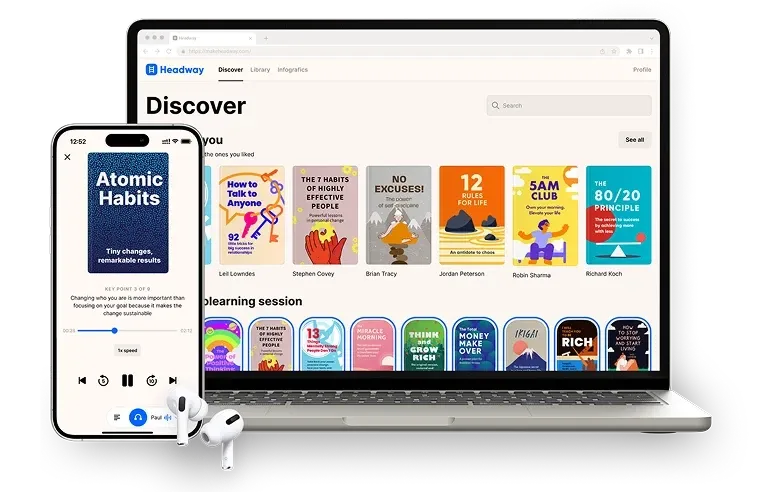
Headway app excels at turning nonfiction books into concise 10–15 minute summaries you can read or listen to anytime. It will be perfect for you if you wish to build knowledge quickly and stay motivated.
Key Features
It transforms learning into a habit. It’s designed to naturally integrate reading knowledge-building summaries into your routine, utilizing specific functions and tools provided by the app. Here’s what you can get:
- Flexible formats: Read text summaries or switch to audio
- Smart personalisation: Recommendations based on reading behavior and interests
- Habit-building tools: Daily reminders, streak tracking, and detailed progress stats
- Offline access: Download summaries for commuting or travel
User Ratings and Social Proof
Headway also maintains an active presence on social media, including Instagram with 3.9 M followers for the account as of 2025. The app reports having more than 50 million total users. The company has its origins in Ukraine, where the product was initially created, and it is also headquartered in New York and maintains offices in San Francisco and Seattle:
- Apple Store: Rating 4.7/5 stars, based on more than 109K user ratings
- Google Play: Rating 4.3/5 stars, based on more than 145K user reviews and 10M+ downloads
- G2: Rating 3.5/5 stars based on 15 reviews (Headway for Business)
- Trustpilot: 4.1/5 Many users highlight that Headway is easy to use, helps them stay motivated, and makes daily learning simple through concise summaries
Integration and Pricing
While Headway is primarily a microlearning app, it supports:
- iOS and Android calendar reminders, and routines for automated learning schedules
- Hands-free audio autoplay, so you can listen to books while you are in the car
- The free tier that provides limited daily summaries
- Premium plans that unlock the full library, audio versions, personalized recommendations, and more
Why We Chose It
Headway demonstrates high user satisfaction across major platforms and offers strong habit-building features that support daily growth and learning. Key advantages include:
- You can change languages and use it for learning Spanish, French, German, Portuguese, and Italian.
- You can use audio mode during commuting or routine tasks.
- You can order great visuals and printables based on nonfiction books.
2. Elevate: Brain Training with Daily Challenges

Elevate's strength lies in delivering short, daily brain-training sessions that target reading, writing, speaking, or exercises focused on math and memory skills. It is designed for adults who want structured microlearning and is considered one of the best apps for this purpose.
Key Features
It’s backed by research and built to improve your mental sharpness. It is built to strengthen core cognitive skills, and offers proven functions such as:
- Personalized workouts: Daily training plans adapted to your skill level
- Cognitive games: More than 40 short games
- Adaptive difficulty: Exercises become more challenging as your performance improves
- Skill tracking: Detailed progress statistics to monitor improvement over time
User Ratings and Social Proof
According to Elevate’s official website, over 80 million users have improved communication, math, and memory through the app:
- Apple Store: Rating 4.8/5, based on 504K ratings
- Google Play: Rating 4.4/5, based on 500K reviews and 10M+ downloads
- Trustpilot: 2.6/5, users appreciate the app's engaging memory and cognition games, noting they enjoy the mental challenge exercises
Integration and Pricing
Elevate is available for iOS and Android, with a basic free plan featuring limited content. Additional features include:
- System reminders for daily training
- Progress syncing across devices
- A premium subscription with full access to all workouts and advanced features
Why We Chose It
Its science-backed exercises foster key cognitive skills with bite-sized sessions. Pair sessions with breaks and switch to "Advanced Mode" for increased challenge.
3. RiseGuide: Expert-Led Microlearning for Everyday Growth
RiseGuide turns idle phone time into short, expert-led lessons you can act on. It breaks self-improvement into interactive lessons of about 7 to 10 minutes, built on the ideas of well-known experts and grouped into step-by-step journeys across areas like communication, confidence, and charisma, among other skills. It will suit you if you want practical learning, built on expert insights, that you can put into action rather than only read about.
Key Features
RiseGuide is built around doing, not just reading. Here's what you get:
- Structured journeys: Step-by-step paths that build one skill at a time, across areas like communication, confidence, and charisma
- Hands-on practice tools: Tools that turn ideas into reps, such as a Speech Analyzer that scores your pace, pauses, and confidence, and a Small Talk Simulator that role-plays real conversations
- Interactive lessons: Short lessons mixing video, flip cards, quizzes, and worksheets, each with a read or listen mode
- Cited expert sources: SEEK (Search Engine for Expert Knowledge) answers only from a curated library of experts and shows the source next to each answer
User Ratings and Social Proof
RiseGuide has passed 1 million downloads and reports around 400,000 monthly active users, with its SEEK search handling about 15,000 queries a day:
- Apple Store: 4.6/5, based on around 19K ratings
- Google Play: 4.1/5, based on around 4.4K reviews
Integration and Pricing
RiseGuide is available on iOS and Android. It offers:
- A reduced introductory price for your first subscription period
- Plans by length: 4 weeks from $19.99 (renews up to $39.99), 12 weeks from $39.99 (up to $79.99), 24 weeks from $74.99 (up to $149.99)
- The exact price shown before you buy, varying with promotions, region, and local taxes
Why We Chose It
RiseGuide fits people who want to practice a skill, not just read about it. The journeys give structure, the practice tools give feedback you can act on the same day, and every lesson traces back to named experts and cited sources. It works best when you commit to a journey and keep a daily habit.
4. Duolingo: A Fun Way to Start Language Learning
If you have not yet tried Duolingo or lack a language-learning app, this is a good starting point. It offers various levels and helps you build a foundation in any language with interactive exercises.
Key Features
Duolingo encourages daily language practice. Its main features include:
- Multi-language courses: 100 courses teaching 40+ languages
- Gamified progress: earn points, keep your streak, unlock new levels
- Integrated skill practice: reading, writing, speaking, and listening exercises
- Bite-sized lessons: also teaches math, music, chess, and offers short sessions that fit into breaks
User Ratings and Social Proof
Daily active users have surpassed 50 million people. It has also been downloaded 960 million times in total:
- Apple Store: Rating 4.7/5 based on more than 4.7M ratings
- Google Play: It offers free downloads and has a 4.6-star rating based on 39.3M reviews and 500M+ downloads
- G2: Rating 4.5 out of 5 based on 137 reviews
Integration and Pricing
Duolingo is available on iOS and Android. You can access the free plan, which includes full basic course access. It also offers:
- The Duolingo Plus/Super Duolingo subscription removes ads and provides offline access.
- The app syncs progress across different devices.
- It sends daily reminders to keep you consistent.
Why We Chose It
Its engaging format and extensive downloads underscore Duolingo's popularity and effectiveness. The range of languages appeals to adults seeking microlearning. For extra practice, focus on pronunciation and review mistakes, incorporating podcasts or shows in your target language.
5. Khan Academy: Free Learning That Feels Like a Personal Tutor
In 2025, Khan Academy remains a trusted free learning platform, making academic subjects accessible to all ages. It structures complex topics into understandable lessons across multiple subjects.
Key Features
Khan Academy provides topics through structured practice and clear explanations. Here’s what you can get:
- Video lessons across core subjects: math, science, economics, history, SAT prep
- Practice exercises: quizzes and step-by-step problems for skill mastery
- Personalized dashboard: recommendations based on your progress
- Mastery learning: repeat skills until fully understood
User Ratings and Social Proof
Khan Academy has 189.6 million registered users. It is available in over 50 languages and in more than 190 countries. The platform offers structured lessons spanning core academic subjects:
- Apple Store: Rating 4.6 out of 5, based on 99K ratings
- Google Play: Rating 4.6 out of 5, based on 170K reviews
- G2: Rating 4.5 out of 5, based on 178 reviews
- Trustpilot: 3.4/5
Integration and Pricing
Khan Academy is completely free on iOS, Android, and the web. It also supports:
- Syncing with Google Classroom
- Full curriculum access across subjects
- Goal-setting tools like Daily Streaks on devices
- It is 100% free; no premium plan is required, and there are no hidden costs.
Why We Chose It
It is a non-profit model, which means it's designed to help, not upsell. Users love it as they can use it to:
- Supplement professional or academic studies.
- Return to learning even if you are an adult.
6. Notion: Custom Learning Hub for Your Notes
Notion isn’t a traditional learning app like Khan Academy, so it doesn’t teach you content directly. However, it can be used as a powerful learning tool, especially for self-directed learners and micro-lessons. It helps you organize all your study materials and lectures in one place in bite-sized formats.
Key Features
With Notion, you can create notes, build databases, and track learning goals. You can also add book summaries and more, making it a strong option for microlearning for self-learners and digital note-takers:
- Custom dashboards: pages, databases, and task lists for organizing study materials
- Sync and collaboration: real-time updates across devices and shared workspaces
- Embedded content: videos, links, PDFs, images, and written notes in one place
- Ready-made templates: spaced repetition, flashcards, research trackers, reading logs, and more
User Ratings and Social Proof
Notion is used by more than 100 million people worldwide, making it one of the most popular tools available today. It gives learners a flexible space to structure lessons:
- Apple Store: Rating 4.8 out of 5, based on 71K+ ratings
- Google Play: Rating 4.7 out of 5, based on 311K+ reviews
- G2: Rating 4.6/5 based on 8,464 reviews
- Trustpilot: 2.6/5. Some users appreciate Notion’s capabilities, and some report mixed experiences with billing and account management
Why We Chose It
Notion’s flexibility adapts to your unique learning style, no matter what or how you study. Therefore, you can easily organize notes into a connected system. You can also use it for building habits like journaling, reading logs, tracking, and more. You can use the Pomodoro technique, applying a time management system.
7. Coursera: University-Level Courses App
Coursera is used by more than 148 million learners and 7,000 institutional customers, providing access to real university courses. It offers courses without traditional tuition costs. It’s one of the strongest options for users who want academic and career-focused microlearning backed by top institutions like Yale or Stanford.
Key Features
With Coursera, you gain expert-led content and real credentials. You can earn full certificates to boost your career. The platform offers quality tools like:
- University-backed content: Courses from Google, Meta, and more
- Video and practice tools: Lectures and graded assignments
- Career credentials: Professional certificates and specializations
- Peer learning: Discussion forums and community interaction
User Ratings and Social Proof
Many users appreciate Coursera for offering real university-level instruction, including credible certificates that support career advancement. It is also flexible and accessible for learners worldwide:
- Apple Store: 4.8/5 stars based on 160K+ ratings
- Google Play: 4.4/5 stars based on 306K+ reviews
- G2: 4.5/5 rating based on 459 reviews
- The Trustpilot page for Coursera displays over 940 reviews; however, as of the last accessible page review, there are complaints about the complexity of subscription pricing, particularly for paid certificates.
Integrations and Pricing
Coursera works across iOS, Android, and desktop. It also supports:
- Device syncing for continued learning on the go
- Calendar reminders for assignment deadlines
- Free auditing for thousands of courses
- It has the Coursera Plus plan for unlimited certificates and full course access
- It is also free to audit (pay only for certification)
Why We Chose It
Basically, it’s like attending university on your own terms. Ideal for professionals and career-switchers. If you are looking for courses with deadlines to maintain motivation and structure, it is perfect, as you can choose Guided Projects, which are typically paid but provide an instructor-led learning experience designed to teach specific skills in about 2 hours.
8. Quizlet: Flashcards and Smart Study Tools
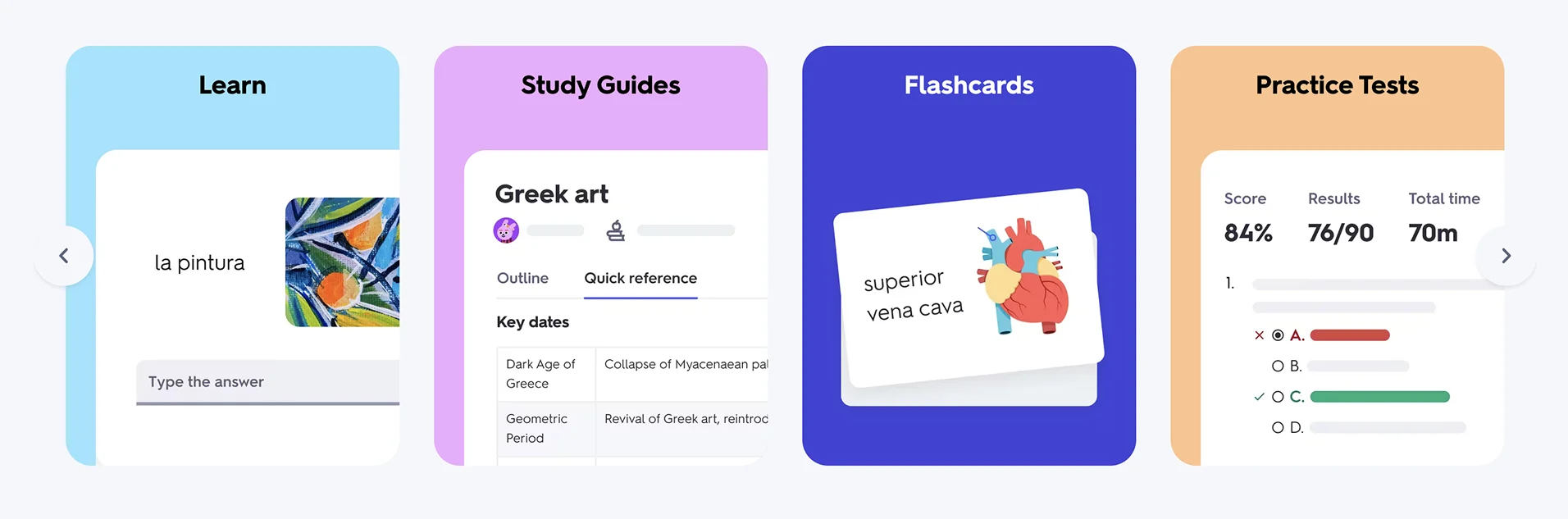
Quizlet is known for its effective study sessions, which utilize spaced repetition and adaptive flashcards. It’s used by students and professionals to memorize terms. Users also state that they easily remember concepts or languages with flashcards. What Quizlet does best is turning repetition into something engaging through smart reminders.
Key Features
You can study solo or in groups and use the app’s adaptive features to make memorization faster. Therefore, you will find some of the main features:
- Flashcards and study sets: Millions of pre-made sets across subjects
- Custom decks: Create your own cards for any topic
- Adaptive learning mode: Focuses on your weak areas
- AI study tools: Smart practice and AI-powered review suggestions
User Ratings and Social Proof
Quizlet is used by more than 60 million active learners each month. It’s designed for quick study sessions, helping you learn terms and languages, including concepts:
- Apple Store: 4.8/5 stars based on 1M+ ratings
- Google Play: 4.6/5 stars based on 448K+ reviews
- G2: 4.5/5, based 289 reviews
- Trustpilot: 1.4/5. With 586 reviews, many users say the app makes memorization faster, and they appreciate the wide range of high-quality user-created flashcards
Integrations and Pricing
Quizlet is available on iOS, Android, and the web, offering two main subscription plans. It supports:
- Syncing progress across devices
- Import and export with Google Docs and spreadsheets
- Free plan with ads and basic modes
- Quizlet Plus subscription for ad-free studying and advanced memory tools
Why We Chose It
It helps both visual and active learners. You can write and test yourself in seconds. It’s also good for quick revision before exams or interviews. You can try the "Learn" and "Test" modes to practice in different ways. You can also pair it with Notion or Google Docs to export and organize your decks.
9. Brilliant: Interactive Learning for STEM and Logic
Brilliant is designed for learners who "learn by doing" and want short challenges in STEM, science, math, tech, logic, and many other areas. It fits into micro-learning routines by using interactive lessons instead of passive reading.
Key Features
It focuses on short, visually guided activities that build real understanding. You’ll find:
- Daily interactive challenges: You get different challenges in computing
- Step-by-step explanations: The app guides you through each problem
- Progress tracking: You get achievement badges to monitor your growth
User Ratings and Social Proof
Brilliant is used by millions of learners worldwide to build strong analytical skills through short, active lessons:
- Apple Store: 4.7/5 stars based on 25K+ ratings
- Google Play: 4.4/5 stars based on 100K+ reviews
- Trustpilot: 4.1/5. It has a high trust score with good feedback from about 2.6K reviews, where many learners say that Brilliant’s interactive approach made challenging subjects feel engaging
Integration and Pricing
Brilliant is available on iOS and Android. It also works on the web and offers a free version to start with. You can use a premium subscription that unlocks all courses, advanced tracks, and offline mode.
Why We Chose It
Brilliant turns abstract theory into workable skills through problem-solving, rather than passive consumption. It’s ideal when you want meaningful exercises that make you active. You can set the Daily Challenges alert to build a habit. You can use your ten minutes a day to strengthen your long-term memory through consistent practice.
10. Skillshare: Learn Creative and Professional Skills

Skillshare is centered around creativity, design, and learning, with a focus on more, and it functions as a microlearning application through its format. It is focused on project-based video lessons from real professionals. It’s used by learners who want skill-focused classes in design, writing, marketing, photography, and more.
Key Features
It’s built for quick, practical lessons with peer interaction and project sharing. Core features include:
- Short classes: Thousands of lessons under 60 minutes
- Creative and professional topics: Design, writing, marketing, photography
- Community learning: Teacher Q&A and peer feedback
- Offline viewing: Download classes on mobile
User Ratings and Social Proof
Skillshare reports over 12 million registered learners on its platform.
- Apple Store: 4.8/5 stars, 25K+ ratings
- Google Play: 4.3/5 stars, 58K+ reviews, 1M+ downloads
- G2: 3.3/5, based on 41+ reviews
- Trustpilot: 3.9 out of 5 based on the reviews of 3,365 users that praise Skillshare’s instructors and project-based classes but mention dissatisfaction with subscription billing and cancellation clarity
Integrations and Pricing
Skillshare is compatible with iOS, Android, and desktop devices. It also supports cross-device class syncing and offline access in the mobile app. You can use the following subscriptions:
- A free trial for new users
- A subscription plan unlocking the full class library
Why We Chose It
Skillshare is a good fit for microlearning because its unique feature is that the lessons are immediately applicable. You can pick a mini-course each week and finish it fully.
11. Nibble: Quick Knowledge Snacks

Nibble is a relatively new app designed for people who want to learn something interesting every day without long lessons. It focuses on microlearning and growth, combining text, visuals, mini-quizzes, and other engaging features to deliver a variety of topics in just a few minutes.
Key Features
It’s built for quick, practical lessons with structured microlearning. Core features include:
- Short lessons: Daily knowledge bites across history, tech, psychology, and science
- Personalized feed: Content recommendations based on your interests
- Mini quizzes: Fast assessments to reinforce key ideas
- Offline mode: Save lessons for learning without internet
User Ratings and Social Proof
Nibble maintains strong ratings across platforms:
- Apple Store: 4.2/5 stars based on 24K ratings
- Google Play: 2.8/5 stars based on 8.12K reviews with 500K+ downloads
- Trustpilot: 3.8/5, based on 2,088+ reviews, with the feedback that highlights its core features, well-designed lessons, and productive lessons as an alternative to doomscrolling
Integrations and Pricing
Nibble works on both iOS and Android, and the app offers subscription plans for full access to all content. It has an offline download option included in the paid tier.
Why We Chose It
Users on the App Store frequently mention that the app is visually strong and easy to scan. You can use its bookmarking tool to save lessons you like and revisit them on a weekly basis. It is ideal for busy learners who prefer varied lessons over longer courses. It offers a diverse range of topics (psychology, science, history, technology, and art), providing learners with more variety compared to most microlearning apps.
Apps Summary Table: Features and Pricing at a Glance
Use This Framework to Select Your Ideal Microlearning App
Choosing the right microlearning app starts with aligning its strengths to the way you absorb information. For example, a visual learner won’t benefit from an audio-heavy app, and someone who wants deep summaries won’t enjoy a fast-skim app. You can review the comparative points, check content depth, support, price and quality, and match them with your personal learning style.
If you rely on quick wins, choose an app with strong streak mechanics. If you prefer deeper context, prioritize platforms with richer summaries. You can take ten minutes today to shortlist two apps that best reflect your goals. Then test each one for consistency in a free trial. When one app feels intuitive, you can unlock its full value by upgrading. Your ideal microlearning tool is the one that works with your habits and needs!


